Sunday, 10 April 2016

Colony S01E01

Synopsis

"When an outside force occupies LA, a former FBI agent and his wife are forced to make tough decisions."

What I thought?

Sky labels this show as "Gripping futuristic thriller" and gives it an 18 rating. If a city being occupied by an alien force and surrounded by a massive wall wasn't too much of a stretch for most viewers, than the terms "thriller" and the use of "18" will be. There was barely any violence, swearing or nudity to warrant anything over a 15-rating at worst. Compared to most other programmes on TV this was almost like an episode of any weekly soap opera than anything pornagraphic or violent. Perhaps this will change in future episodes? Certainly there is a simmering darkness and grittiness to the show throughout that's really being forced upon us, but all in a rather artificial way. It does a decent job of setting the premise for the rest of the season in this episode and giving us a taster of everything that's going on but it's certainly not making me feel anything like it's a thriller just yet.

The show centres around Josh Hollaway's character Will, his wife Katie and to a less extent, their children. Will was an FBI come miltary hard nut before the alien occupation and it seems most of his colleagues have been removed from the occupied land. Thus he's undercover and hiding his real identity. No matter, that all goes to hell before the end of the episode. After copious very unsubtle pointers in the first five minutes that this family is missing one child, Will and a helper are smuggled like fish (literally) in a truck through a checkpoint into the next presumably occupied zone. This is where the missing son, who it seems was separated from the family at the start of the occupation, resides and it's somewhat Will's fault going by conversation he has with his wife. Things are going well until another lorry explodes at the checkpoint causing carnage. Naturally almost everyone else is killed except Will, who is then bundled into some sort of detention centre by "red hats" who appear to ruthlessly control law and order in the occupied colony. They aren't aliens though. Just humans given these roles. They look like hard nuts too and don't seem to do anything pleasant. Regardless, Will's former identity is discovered and he's brought to the colony's governor, Proxy Alan Snyder, who is played by Peter Jacobson portraying a character so uncannily similar to that which is he played in Ray Donovan. You'd hardly know the difference. Thankfully that was an amusing character. This guy brings an air of joy and humour to proceedings but doesn't really ever go too OTT on knocking what are some really severe issues going on all around them. In return for his freedom Alan asks Will to work for him to discover who makes up the resistance. As it happens, Will's wife Katie is in the resistance, unknown to Will, but undoubtedly highly suspected by us all throughout the episode, not least by the cliffhanger reveal being spoken about in almost every trailer for this show beforehand. Sigh. Yes, we all knew this before we started watching! It's not a surprise.

So, we have a show that is 'Lost' meets 'V' meets 'Under the Dome'. It's got the mystery of Lost, the alien occupancy of V and the "trapped in a location for an unknown reason" bit of Under the Dome. Thankfully this opening episode isn't as badly scripted and acted as Under the Dome, but isn't as dramatic and captivating as Lost. But it's a decent opener thanks largely to not revealing very much about the aliens, if anything. There's some gorgeously beautiful CGI views of the huge wall surrounding the colony, which is not quite on the Game of Thrones scale for walls but pretty impressive anyway. I'd say this show is very much more like V than the others and hopefully they'll keep to their word of drip feeding us information about the aliens, because much like Lost, a lot of people went south when it all went sci-fi on us. Not me though, I loved that show and still do. Colony hasn't started anywhere near on the same level as Lost did but it's made a decent stab at it and has a mystery kept thankfully at arm's length from us, therefore making me curious enough to keep watching.

Rating 6/10 (DECENT)

By the time they actually told us, it was obvious a family member was missing thanks to numerous camera angles telling us.

Will took to being smuggled in a container like a cool guy.

Guess who was the only survivor of the bomb in the nearby lorry? Yes, Will.

Will's wife goes around like a badass but it really doesn't feel natural.

It's that guy from Ray Donovan! And he's playing the same character from what I can tell.

The only time we get close to seeing the aliens is in this beautiful CGI moment of their ship taking off.

Josh's mandatory shirtless moment.

The wall blends in so well that it's hard to notice it most of the time.

Who do you like your eggs in the morning? Alan arrives for breakfast.

Secret codes. Secret knocks. Secret rooms. Oh look, Katie is in the resistance. Yes, Yes. We knew this from the trailers!

Sunday, 3 April 2016

Star Wars Rebels S02E21 "Twilight of the Apprentice"

Synopsis

"After gaining information about the Sith, Kanan, Ezra and Ahsoka battle the Inquisitors with the help of a new ally, but are overmatched when Vader arrives."

What I thought?

This is the first ever episode of Star Wars Rebels that I've watched twice. I rarely watch anything a second time, not least all the way through. Some of the reason for that I won't go into here, but did my views change from first to second time?

Yes, they did. On first watch I was underwhelmed. Probably because I'd been so hyped up about a massive finale, Vader, and someone probably dying, that when it didn't all happen the way my mind had somehow predicted, it was naturally deflated. But, there's a heck of a lot contained in this episode and lots to digest long after it's finished, which is why this episode is most definitely rewatchable as you debate and re-debate nuggets of information amongst the massive reveals.

In short, Ahskoa, Kanan and Ezra find a sith temple. The former Darth, Maul, seduces Ezra when he becomes separated from the other two, slowly fueling his darker sides as they uncover the secrets of the temple. How much Maul is betting on Ezra being the apprentice that he claims near the end, is anyone's guess. All Maul wanted was the power behind the temple to destroy all his enemies; Jedi and Sith. Throughout the episode, the inquisitors are there, including a new one, who seem to only be a plot point to distract our heroes before they run away and then come back at inconvenient points. The Grand Inquisitor in series one was awesome. He was mysterious, strong and had great dialogue. The inquisitors in the second series are just annoying, quite frankly, and carry no weight to them other than the inconvenience one might feel after stepping in dog poo. Not to worry, because Maul kills two of them (off-screen deaths of course, this is a cartoon) and although the 3rd one kind of gets away, it's ambiguous if they died. But it's suggested from other sources that they are indeed dead. This could be the end of the inquisitors. As a concept they are great, but this second season they've been much of nothing really.

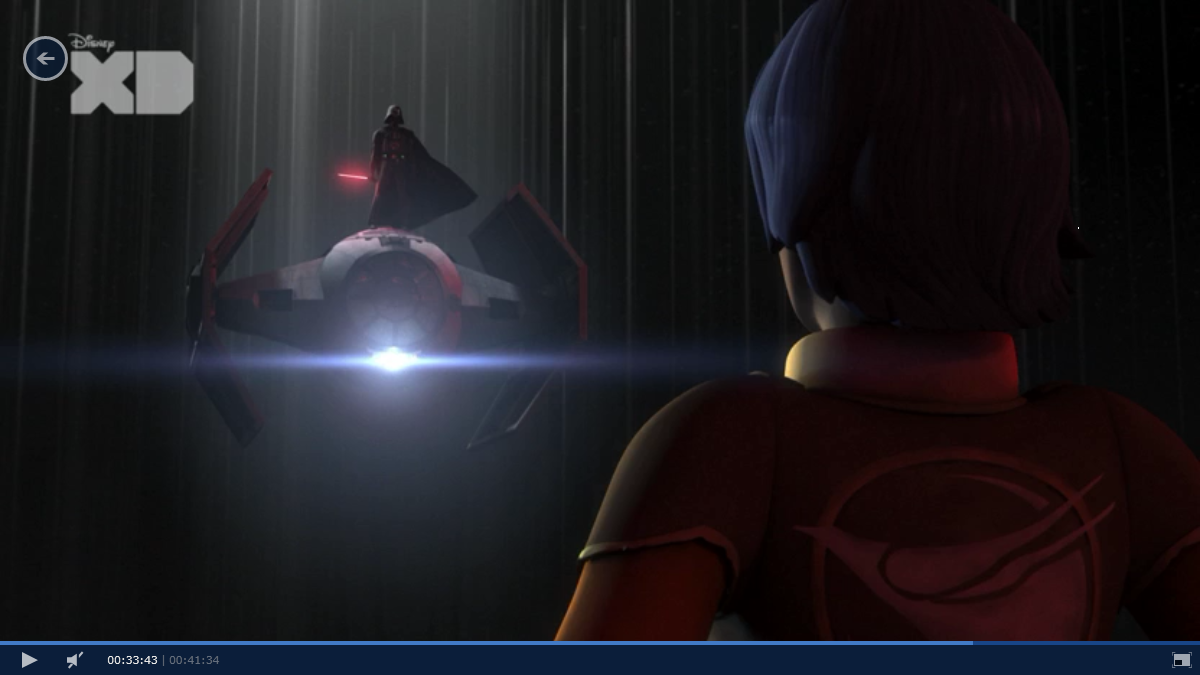
Vader arrives near the end, on top of his tie-fighter! An awesome entrance. He chats too much for me, but only just too much. Maul is very chatty throughout the episode but this is the post-film Maul who does nothing but natter. He's very different to the film's Maul who was almost mute. I like Maul, but somewhat prefered him when he hardly muttered a word. Word on the street though is that Maul is the third season's main foil for our rebels. He doesn't care much for them, but we can be sure he cares less for the Empire.

We never saw Maul Vs Vader but we did see some of Ashoka Versus Vader. The fighting wasn't overly dramatic but the cinematic display throughout this episode, along with background music was awesome. Vader seems to do nothing but stride and push his lightsabre about these days rather than be too animated, but he's clearly dark, evil, big in stature and powerful. Naturally one can never have enough Vader on screen.

So, at the end what do we have? Looks like Ashoka will be playing less screen time next season, going by rumours. She's still alive, despite everyone believing she was destined to die in the finale. Vader is slightly battered from the experience. Probably more battered than I'd expected given his powerful awesomeness. Kanan ends up blind, which looks permanent. This probably spells more trouble for Ezra as with Ashoka and a slightly more subdued Kanan we now have clear evidence from this episode that Ezra is dabbling in the dark side much more.

A few quibbles; Vader, arrives on top of ship. Autopilot? It flies away when he dismounts? Guess it must of been. I also didn't think how reasonable Kanan and Ahsoka were with Maul rang quite right either. And why would Yoda send them there? Lots to think about.

Rating 8/10 (GREAT)

It started with a ... ship, of course. Hic!

Anyone falling from that height, with that much rubble, would be dead or very hurt but alas our heroes are fine.

Maul didn't really help at all with the doors.

Chopper was awesome as always. Manning the tie-fighter guns was cool.

The Inquisitors this season are really a menace and annoying, carrying little threat.

Some beautiful visuals in this episode.

Cool use of lightsabers but far too much of it and somewhat ridiculous.

Now this is how you make an entrance.

The man behind the mask.

How dark is Ezra going to go next season?

Monday, 28 March 2016

Star Wars Rebels S02E20 "The Mystery Of Chopper Base"

Synopsis

"Kanan, Ezra and Ahsoka prepare to depart to unravel Vader's secret, while the rebels find a way to fend off the predatory creatures that occupy the planet."

What I thought?

The calm before the storm ...

A run of the mill episode with a rather unimaginative main plot on top of the underlying preparations for Kanan and Ezra to go Inquisitor hunting. Things start off somewhat interestingly, with Kanan and Ezra lightsaber dueling, but when we get to the mystery of the planet and the discovery of large big head spiders lurking, it's really nothing new or engaging. The standard scary reveal, following by someone being captured, the rescue, the trap and then the figuring out how to escape - it's all pretty typical plot stuff. It's not awful, but it's also not really anything to get invested in. The spider creatures don't like the rebel transmitters, so it turns out, but only keep about a foot away from them. Sure they put tens of them around the base, but the critters still walk right past them, but don't enter the base at the end. You'd think one day they'd figure out just to grin and bear the transmitter for one second and, hey presto, they are in the base!

So, we get farewells at the end as the team head off to the planet that Yoda told Ezra to go. The one where we know Darth Maul lurks. Will Ezra really go bad or just flirt? I'd bet on the latter although love the former suggestion. We know we've got inquisitors and Darth Vader in the hour finale and I can't wait.

Rating 5/10 (OK)

Ezra is pretty nifty with a lightsabre these days.

How great it was to know that there is a creature Ezra can't use the force to communicate with!

So, they rescued Rex, but no one mentioned the other rebel who went missing!

The transmitter scare the creatures at least a yard or two away.

Certainly they are scary creatures, but lets face it, the rebels did attack them first!

Windows 10 System Apps Review: Conclusion

Note: This page forms part of the post Windows 10 System Apps Review

And so my review of all 29 system apps available in Windows 10 v1511 comes to an end. This means it’s time for some conclusions.

When one tots up the ratings I gave for each app we end up with:

HIT         13
MAYBE 12
MISS      4

This at first appears as if the vast majority of the apps performed excellently, although it’s worth remembering that “Do they do the job they were primarily designed for?” was the main criteria, which for a lot of the apps was fulfilled either because they couldn’t fail (e.g. ‘Get Skype’ app is just a link) or because, love them or loath them, they do actually do a basic job (e.g. People app).
Being a ‘Hit’ doesn’t mean they are the pinnacle of their genre, or that there isn’t room for some improvement, or lots of improvement. But when an app does do a decent job on its basic functionality, it’ll be all too easy to knock them down. I tried to come at the reviews from the angle where I imagined the vast majority of desktop users looking at each app to deliver on their own basic expectations in terms of functionality and usability.

Sure, most UWP apps look bland and lack sophistication but does that make them useless? As I found, most of the apps deliver something to the user, although whether anyone would actually notice the apps in the first place, or use them as a first choice to do a specific function … well, that’s another story altogether. Easily you can get better functionality and usability elsewhere for all but a few of the apps Microsoft offers for free. If you look at alternatives you can use on Windows 10 to any of the 29 system apps, it’s most likely only perhaps Alarms and Clocks, Calculator, Contact Support, OneNote, Store, Sway & Voice Recorder would be those you would be highly tempted to use in the first instance rather than going elsewhere. On the desktop the alternatives are vast and thus the system apps for most people are not the first choice. On Windows 10 mobile it’s most likely a totally different issue because there aren’t a lot of high quality alternatives.

From a Windows 10 desktop perspective the end conclusion is:
  • Could the offering of system apps be better? Hell yeah. They could be considerably better.
  • Are the offerings of system apps poor? No. There’s some usefulness in most apps and a decent ‘stab’ at basic functionality.
  • Could you do without most of the system apps? Yes. Easily. And therein lies the problem at this juncture for Microsoft and their crusade to promote UWP as a big deal


MY RATING
ARE THERE BETTER ALTERNATIVES?
3D Builder
MISS
MAYBE
Alarms and Clocks
HIT
NO
Calculator
HIT
NO
Calendar
MAYBE
YES
Camera
MAYBE
MAYBE
Contact Support
HIT
NO
Films & TV
MAYBE
YES
Get Skype
HIT
NA
Get Office
HIT
NA
Get Started
HIT
MAYBE
Groove Music
MAYBE
YES
Mail
MAYBE
YES
Maps
MAYBE
YES
Messaging
MISS
YES
Microsoft Solitaire Collection
HIT
MAYBE
Microsoft Wi-Fi
HIT
MAYBE
Money
HIT
MAYBE
News
MAYBE
YES
OneNote
HIT
NO
People
HIT
YES
Phone
MISS
NA
Phone Companion
HIT
YES
Photos
MAYBE
YES
Sport
MISS
YES
Store
HIT
NA
Sway
MAYBE
NO
Voice Recorder
MAYBE
NO
Weather
MAYBE
YES
Xbox
MAYBE
NA

Windows 10 System Apps Review: XBox


Note: This page is a review which forms part of the post Windows 10 System Apps Review

What’s this app for?

“The Xbox app brings together your friends, games, and accomplishments across Xbox One and Windows 10 devices.” So says Microsoft. I had to get their quote because I wasn’t sure myself how to explain this app to anyone J

Does it do the job it was primarily designed for?
I know what you’re thinking. “I’ve not got an Xbox, so what use is this app to me?” Well, fear not, because Microsoft has made this app more than just about that games console taking up space in your front room. Game apps created by Microsoft in Windows 10, such as Minesweeper and the Solitaire Collection, integrate with the Xbox app for all the social aspects of competing with friends. And if that doesn’t grab your attention, then probably the rest of this review won’t either.


The home screen of this app is quite busy. You’ve the main menu down the left side which is expandable via the hamburger icon, with the rest of the screen taking up by a large “Activity Feed” panel with a “Friends” panel on the far right. If you use Facebook you’ll be mostly at home here in terms of the social mechanisms.  

In the Activity Feed you can post your gaming achievements to share with friends, as well as view a lot of posts by Xbox about games you’ll likely not play if you’ve no Xbox. Sigh. Plus I can’t find a way to not see Xbox posts sadly. Never mind. Anyhow, over in the friends panel you get access to see which friends are online, find friends, create a games party (yes, to play games together), view messages between friends, and see all comments friends have made about what you’ve posted. Absolutely everything you could think of for interacting with your friends is most definitely there. You can even connect the app to Facebook should you so wish.


Off the main hamburger menu are 10 options; your avatar profile (of which you have to create one when you first open this app), home screen (where you start off), My Games, Achievements, Game DVR, Trending, Store, OneGuide, Connect & settings. Avatar wise the options are numerous but, where there is no choice, is in terms of photo. You have to choose an image for your photo from a decent choice but you can’t put your own mugshot there. Well, this is an avatar I guess. In this section you can also view the games you’re playing, your achievements in those games, who your friends are and some other basic customisation options for your avatar. It’s certainly quick and easy to set up an avatar.


Next down the main menu is ‘My Games’ which for me consists of just “Microsoft Solitaire Collection” but undoubtedly they’d be many more for serious game fans. The games don’t have to be Xbox ones or apps but can be more traditional PC games in much the same way ‘Steam’ supplies you games from the cloud. ‘Achievements’ shows you how well you’ve done in your games, with numerous quests to complete to get more XP (think street-cred). ‘Game DVR’ is where you can see game clips from any game that interacts with this Xbox app. Sadly, though, not all Windows 10 PCs support this feature, and my laptop is one that can’t do this, thus it’s useless to me. ‘Trending’ is an at-a-glance look at what games everyone likes which you can play via this app. ‘Store’ is a front-window into the actual Store app to download/purchase Xbox app supported games. ‘OneGuide’ relies on you having an Xbox connected in order to view TV Listings. Thus I have nothing further to say here. ‘Connect’ likewise needs an Xbox. Lastly we’ve ‘Settings’ of which there’s quite a few options within. As well as signing in and out of your account, you can setup a link to your Facebook account, turn the live tile on/off, change various notifications that the app can alert you to (such as when a friend sends you a message) turn off friends posting in your activity feed (argh, but I want to turn off Xbox posts!) and lastly, an option to show game streaming on the app’s home page (another feature useless without an Xbox). There are even more options via the mini settings menu which are very much more tailored towards those with an Xbox.

Bizarrely there’s no setting to change between the light and dark theme in this app. You’re stuck with blackness, which works ok but is a little depressing perhaps. There’s not a lot I can say that I dislike as even though maybe half or more of the app is useless without an Xbox, the social features and achievements are still just as relevant if you just play Windows 10 game apps or classic PC games that integrate with this Xbox app. It is a bit annoying that you have to create an avatar to use the app but at least it’s a quick process.

What’s the alternative?

For social features when using Microsoft Xbox integrated games, there’s no alternative. This is what the Xbox app is for. Most, like me, might be used to using ‘Steam’ for their PC games although I much prefer the social aspects of the Xbox app than those in Steam, where it’s very cluttered and confusing to really interact with people.

Hit, Miss, or Maybe?

Maybe; even though without an Xbox console this app is largely redundant, if you are a bit of a games player via Xbox apps on Windows 10, you’ll probably find the social and achievements aspects of this app useful and fun. If you’re not interested in games at all, or play your games solely via the likes of Facebook, this app is of no value at all.

Windows 10 System Apps Review: Weather


Note: This page is a review which forms part of the post Windows 10 System Apps Review

What’s this app for?

This is your one-stop shop for finding out the current weather conditions and forecast in your part of the world, as well as anywhere else on the planet that you’ve got a particular interest in.

Does it do the job it was primarily designed for?

Umm. Well, the fact that I don’t use this app at all when it comes to weather forecasts should say it all. There’s some lovely aspects to this app such as fantastic live tile support, beautifully animated and relevant background graphics behind the forecast, and great quick-access/snapshot of favourite locations. Sadly none of these are enough for me to bother with it on a daily basis, except that the live tile looks cool in my start menu. There’s no doubt though that the wealth and variety of content is very good in this app. It’s just that it’s delivery of that information isn’t up to the same standard.


As you can see above, the default view (with the hamburger menu expanded) tells you right away what’s going on in your chosen location, as well as what’s coming up in the proceeding days and hours. It’s a great one-stop visual guide to what’s going on. I’m not sure I have a lot of confidence in the accuracy but it’s usually good enough in this aspect. After all, these are forecasts, not guaranteed predictions. The initial amination you get when you first land on the home screen is pretty cool, although on a rainy day I’m not sure I really want such a visual reminder. If anyone out there gets fed up with all the usual waffling in forecasts, they’ll love the ‘Day Details’ which you can view as you keep scrolling down the home screen. Everything is explained in a few short sharp sentences. Certainly this won’t leave you guessing, although I’m the kind of person who would rather have an essay than a headline. Even further down the screen is yet more useful information such as sunrise/sunset times, moonrise/moonset times, moon phase, precipitation/humidity/UV index and Max Wind values for the current day. Lastly there’s precipitation and temperature stats for this day in terms of historical records. Certainly there’s a wealth of useful and less useful (yet interesting) information here, but scrolling down for it all is pretty tedious on a desktop PC. Plus, there’s a section all for historical data in the app, so why put this information here? Oh well.


The next section available in this app to you from the main hamburger menu is ‘maps’. Here you can see temperature, precipitation, satellite and cloud cover for your neck of the world, as well as the ability to scroll chronologically through the next 24-ish hours to see how these four features change over time. It’s nothing revolutionary but useful. There’s a zoom button on the map but for some reason it doesn’t zoom in all that well. Some of the maps (the temperature one especially) looks particularly blurry. Still, this is a decent stab at this facility, although it certainly could do with something that makes it look a lot more polished.

Next up off the hamburger menu is ‘historical weather’ which strangely is just a list of months in your chosen location, along with temperature and rainfall records. It’s interesting, but there’s hardly enough information here to warrant its own section in the menu.

‘Places’ is the next option from the main menu, and probably the one part of the app I actually load it up to look at on any regular basis. Here you can add favourite places from all around the world and get a snapshot view of their current weather conditions all on the same screen as your other favourite places. I really love this. It’s simple, useful and pretty. Clicking on any of the places will change the app so that the Home, Maps and historical data sections are now reflecting that location. It’s a quick way to check out the weather in locations you have an interest in. You don’t have to set favourite locations just to check out weather around the world as there is a search box up the top right of the app that’s always present. This allows you to search for a location, select it from a list and have the app display that location’s weather whenever you feel like it.


The final option from the menu is for ‘news’. As you’d expect this is the section that provides you with all the latest weather news that’s been pulled from relevant news sources from your part of the world. Unlike the sports app, all the articles I’ve clicked on here do open in the app’s reading view. Thus providing a consistent and neater way to read. There’s a few slideshows and video articles in amongst actual textual content but hardly a sniff of any advertisements anywhere in this app. The only downer in this section is that the actual content is months old. I’m assuming this is a bug in the current version of the app. There’s no manual refresh page button either sadly. I don’t remember noticing old content before, so perhaps just a bug at this current time.


Settings wise … there are some! Woohoo. Don’t get too excited though. As well as choosing the units of temperature for the app to display in, you can change the default launch location for the app, which is highly useful as there are limitations to Windows 10 detecting your location automatically. So being able to tell it where you are is critical and very much appreciated.

What’s the alternative?

There’s no other weather information built into Windows 10, but of course there are a wealth of apps in the store from 3rd parties such as The Weather Channel or Accuweather to choose from. Alternatively, and what I often do, there are numerous reputable websites to find weather information, such as The Met Office here in the UK.

Hit, Miss, or Maybe?

Maybe; the variety and amount of information available in this app is very good. There is a gorgeous live tile and some lovely features but there’s something a little unfinished about the app in some areas when it comes to its Maps and Historical Data sections. What also doesn’t help it is all the scrolling on the main screen, which gives the impression they really didn’t think about desktop users. Plus there’s the rather basic manner in which it delivers its forecast. On a desktop PC most users will not bother with this app and instead go straight to their favourite weather related website which will deliver a more well-rounded experience.